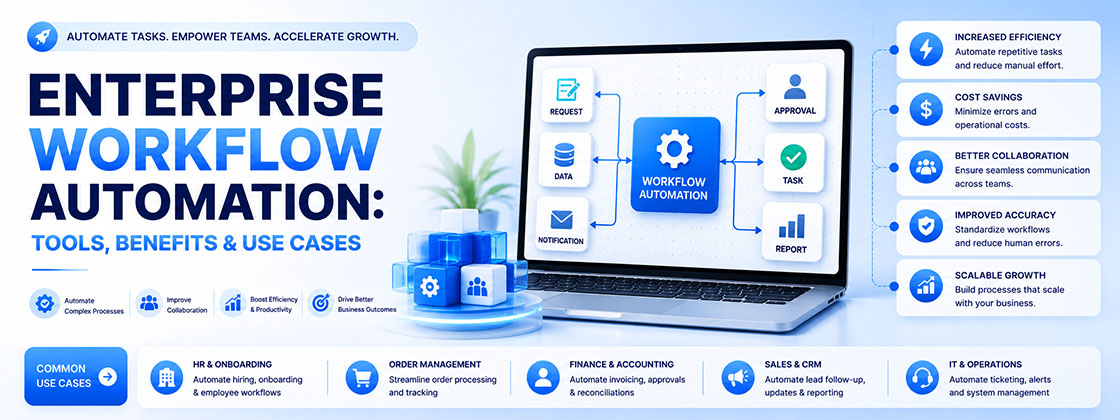
Enterprise operations rarely depend on a single system or a single team. Marketing, sales, finance, customer support, and operations often rely on different platforms and processes, creating handoffs that can slow work down and introduce unnecessary manual effort.
This is where enterprise workflow automation becomes valuable—not simply by automating tasks, but by connecting the processes behind them.
A strong enterprise automation strategy should be built around five core capabilities:
- Scalable workflows designed for complex business operations
- Flexible automation that can adapt to different teams and processes
- Connected integrations across CRM, marketing, finance, and other enterprise systems
- AI-powered workflows that support faster decisions and reduce repetitive work
- Security and governance to maintain control as automation expands
The goal is not to automate everything. It is to identify the processes where automation can create measurable improvements in efficiency, accuracy, speed, and business performance.
In this guide, we’ll look at how enterprise workflow automation works, where it can deliver the most value, what features businesses should evaluate, and how to build an automation framework that can scale without creating another layer of disconnected technology.
Enterprise Workflow Automation by the Numbers
Before comparing platforms, it helps to see what the current data actually shows — including the parts most vendor content leaves out.
- The global workflow automation market was valued at roughly $23.8 billion in 2025 and is projected to reach $80.6 billion by 2035 as adoption accelerates across mid-market and enterprise buyers.
- Only about 4% of businesses have fully automated their core workflows — most organizations are still running partial, disconnected automation across separate tools.
- Well-scoped automation projects typically cut cycle times by 40–50%, and enterprise teams commonly see payback within 3–8 months of go-live.
- Independent research has found that a majority of enterprise AI projects fail to deliver their expected value — usually not because the AI itself is weak, but because it gets layered onto a process that was never properly mapped, owned, or governed.
That last point is the one worth sitting with. The businesses that get real ROI from automation aren't the ones with the most advanced tool stack — they're the ones that mapped the process, fixed what was broken first, and gave the workflow a clear owner before automating it. That's the sequence EvoKast follows on every engagement, starting with a free audit rather than a tool pitch.
What Are Enterprise Workflow Automation Solutions?
Enterprise workflow automation solutions help organizations replace slow, manual, multi-step processes with automated, rule-based, and AI-powered workflows. Instead of relying on people to manually move a task from one stage to the next — checking a spreadsheet, sending a follow-up email, updating a CRM field — these systems execute the action, apply the business rule, and route the work automatically.
This reduces delay, removes human error from repetitive steps, and gives leadership real visibility into where work actually is at any moment — instead of having to ask.
However, enterprise-grade workflow automation is meaningfully different from basic task automation. It's built to be scalable, secure, governed, and deeply integrated with the systems a business already runs on — CRM, ERP, finance platforms, HRMS, and marketing tools. A properly built enterprise system can handle high transaction volumes, enforce access controls, and stay reliable as the business and its process complexity grow.
A complete enterprise workflow automation solution generally includes:
- Orchestration of multi-step processes — sequencing steps across systems and teams so nothing depends on someone remembering to do the next thing.
- Automated approvals and routing — sending the right task to the right person automatically, based on rules rather than whoever happens to be free.
- Event triggers — a form submission, a new lead, a status change, or a scheduled time that kicks a workflow into motion without manual initiation.
- Connectors for system integration — linking CRM, ad platforms, WhatsApp, email, and finance tools so data moves between them without manual re-entry.
- AI/ML-powered decisioning — scoring, classifying, or drafting where a human previously had to review every single case.
- Auditability — a complete, timestamped log of what happened, when, and why — essential once a workflow touches real revenue or compliance.
It's worth being precise about the difference between task automation and enterprise workflow automation. Task automation handles a single, isolated action — auto-filling a form, sending one reminder.
Enterprise workflow automation manages the entire end-to-end process, connecting multiple teams, systems, and data sources into one continuous flow.
Why Enterprises Need Workflow Automation
Modern organizations are under more pressure than ever to move faster, operate more accurately, and do it without proportionally growing headcount. That pressure is what's pushed workflow automation from a nice-to-have into a genuine operating requirement. Here's why.
1. Growth of distributed and remote teams
With teams spread across cities, states, or countries, manual handoffs slow everything down — a task sitting in someone's inbox overnight because they're in a different time zone is no longer an edge case. Workflow automation keeps tasks moving regardless of who's online right now.
2. Rising process complexity across every function
Marketing, sales, finance, HR, and operations now handle more data, more channels, and more steps than they did even two years ago. What used to be a simple handoff between two people is now a process touching four or five different tools. Automation is what keeps that complexity from turning into chaos.
3. Pressure to cut turnaround time and remove redundancy
Customers and internal stakeholders alike expect faster answers. Automated workflows eliminate the repetitive steps and duplicate approvals that quietly add days to a process that should take hours.
4. Need for compliance, audit trails, and standardization
Regulated industries — and increasingly, every industry — need to prove that a process was followed correctly, not just claim it was. Automation builds the audit trail and consistency in as a byproduct of running the workflow, rather than as a separate reporting exercise afterward.
5. Rising customer expectations for speed and consistency
Customers now expect instant confirmations, fast follow-up, and error-free service as the baseline, not the exception. A lead that doesn't get a response within minutes is a lead a competitor is now working.
6. Clear, measurable business value
Beyond the operational case, the numbers are hard to ignore: faster execution, fewer manual errors, higher team productivity, and lower operating cost per transaction — all without adding headcount at the same rate as growth.
Core Components of Enterprise Workflow Automation Solutions
Enterprise workflow automation relies on several connected layers working together. Each plays a distinct role, and no single layer replaces the others — a full system needs all of them.
1. Workflow Orchestration Engine
This is the core engine that manages the end-to-end process. It controls the sequence of steps, applies business logic, and makes sure tasks move smoothly from one stage to the next without stalling.
2. Integration Layer
Because enterprises run on many systems at once, the integration layer is what makes the whole thing work. It connects CRM, ad platforms, WhatsApp, email, finance tools, and databases through APIs or connectors — so data moves automatically instead of being copy-pasted between tabs.
3. Rules & Policy Engine
This layer applies conditional logic, validation rules, and approval paths. It's what ensures a process follows the actual business policy every time, instead of depending on whoever happens to be handling that particular case.
4. AI & ML Layer
AI adds intelligence to the workflow — supporting lead scoring, document classification, message drafting, and predictions that previously required a person to manually review each case one at a time.
5. Data & Audit Layer
This layer stores workflow metadata, logs, audit trails, and analytics. It's what gives leadership real visibility into process performance and what makes compliance reporting possible without a manual reconstruction after the fact.
6. User Interface Layer
Finally, the UI layer provides the forms, dashboards, and alerts people actually interact with — letting teams submit requests, monitor workflows, and step in to handle exceptions when the system needs a human judgment call.
Types of Enterprise Workflow Automation
Organizations choose from several categories of automation technology depending on their existing systems, workflow complexity, and where the biggest bottleneck actually lives. Here's how they compare and where each one fits.
| Solution Type | Best For | Limitation |
|---|---|---|
| BPM Platforms | Complex, multi-department processes needing audit trails and case management | Heavier setup, often needs dev or consultant resources |
| RPA Bots | High-volume, rule-based tasks on legacy systems without APIs | Brittle when UIs, layouts, or data formats change |
| iPaaS / Integration Tools | Connecting SaaS apps and syncing data across cloud and on-prem platforms | Not built for approval logic, case management, or judgment calls |
| CRM-Based Automation | Lead routing, follow-up, pipeline management, and revenue workflows | Scope generally limited to CRM-adjacent processes |
| AI Agents | Variable, judgment-based tasks — triage, scoring, drafting, summarizing | Needs governance, monitoring, and human checkpoints |
Business Process Management (BPM) platforms
BPM tools provide comprehensive workflow management for complex, structured processes — the kind that involve multiple departments, systems, and formal approval chains. They're strong on process modeling and audit trails, but usually need more setup time and technical resourcing.
Robotic Process Automation (RPA)
RPA bots automate repetitive, rules-based tasks by mimicking how a person interacts with an application — logging in, copying data, filling forms — without needing to change the underlying system. It's a good fit for legacy tools that don't offer a modern API, but it can break when a UI layout changes.
Enterprise Integration Platforms (iPaaS)
Integration platforms connect disparate systems so data and processes can flow across cloud and on-premises applications. They're the connective tissue for a tech stack with many SaaS tools, but on their own, they're not built to handle approval logic or case management.
CRM-Based Automation
This is where marketing, sales, and follow-up actually connect — lead routing, scoring, pipeline stage automation, and drip sequences all live here. For most growing and mid-market businesses, this is the fastest path to measurable ROI, because it sits directly on top of where leads and revenue already flow.
Custom Automation Using AI Agents
The newest category involves building automation using AI agents powered by large language models. These agents understand natural-language instructions, reason through variable scenarios, and can complete multi-step tasks — like drafting a follow-up message, summarizing a lead's history, or triaging a support query — without every single step being explicitly pre-programmed.
Choosing the right category
- Consider BPM tools when processes are well-defined, cross-departmental, and need strong audit trails.
- Select RPA when you're automating legacy systems without APIs, or need a fast tactical fix without re-architecting anything.
- Choose iPaaS when the priority is connecting multiple cloud apps and keeping data in sync across them.
- Start with CRM-based automation when the real bottleneck is lead follow-up, pipeline visibility, or sales handoffs.
- Add AI agents when the process is too variable for fixed rules and genuinely needs judgment — not just routing.
Most businesses ultimately use a combination — there's rarely a single tool that covers everything, and forcing one approach onto every workflow usually creates more friction than it removes.
How Enterprise Workflow Automation Works
Every automated process typically follows the same underlying sequence, regardless of which platform is running it.
- Event-based trigger — a form submission, a new lead, a status change, or a scheduled time starts the workflow.
- Workflow logic execution — the orchestration engine applies business rules, routing paths, and validation steps.
- System integrations — APIs, connectors, or RPA bots communicate with the CRM, finance platform, or database involved.
- Human approval, when needed — tasks requiring judgment or compliance sign-off route to the right person with a clear audit trail.
- Final action — the workflow updates records, sends a notification, generates a document, or kicks off the next workflow downstream.
For this to hold up at real business scale, the underlying architecture needs to support high concurrent workflow volume, automatic recovery when something fails, real-time monitoring so bottlenecks are visible before they become a crisis, and built-in logging for compliance and audit needs.
Benefits of Enterprise Workflow Automation
1. Operational efficiency: Automated workflows cut cycle times by removing the delay caused by manual handoffs. Approvals move the moment they're triggered instead of sitting in an inbox, so teams complete full processes faster.
2. Reduced errors and improved accuracy: By automating repetitive, high-volume tasks, organizations reduce the human intervention points where mistakes creep in. Processes become consistent and predictable, which raises overall output quality.
3. Better compliance and visibility: Automation enforces standardized steps, so every workflow follows the approved policy every time — not just when someone remembers to check. Built-in audit trails and automated reporting make compliance reviews far less painful.
4. Faster decision-making: AI-powered recommendations surface real-time insight, so teams can act on risk or opportunity sooner instead of waiting for a weekly report to catch up.
5. Cost savings: Automation reduces the manual labor required for routine processes, and it lowers rework costs, since fewer errors mean fewer corrections downstream.
6. Improved customer experience: Customers get faster responses, shorter wait times, and more accurate updates. Consistent, prompt communication builds trust that manual, inconsistent follow-up simply can't.
Real-World Use Cases for Enterprise Workflow Automation
Enterprise workflow automation shows up differently depending on the department — but the underlying pattern is always the same: replace manual coordination with a connected, rule-based system.
Sales & Marketing
Revenue teams benefit the most, the fastest, because this is where leads either convert or quietly disappear.
- Lead assignment: distributing leads automatically by geography, industry, or a scoring model, instead of a manual round-robin.
- Instant follow-up: WhatsApp and email sequences that fire the moment a form is submitted — see how this connects inside CRM & Systems.
- Ad-to-CRM attribution: every lead auto-tagged with source, campaign, and ad at the point of capture, so spend decisions are based on real data.
- Proposal and contract workflows: automating drafts, internal review, and approvals so deals don't stall waiting on a signature.
CRM & Revenue Operations
- AI-assisted lead scoring, so sales teams call the hottest leads first instead of working the list in the order it arrived.
- Pipeline stage automation with reminders for deals that have gone quiet.
- Attribution dashboards that tie ad spend directly to closed revenue, not just clicks.
HR & People Operations
HR touches multiple systems and stakeholders per employee — automation is what keeps that experience consistent.
- Onboarding: generating accounts, assigning training, and notifying managers without manual coordination.
- Leave approvals: routing requests instantly with automatic notifications, instead of a chain of forwarded emails.
- Performance management: automating reminders and review-cycle submissions so nothing falls through the cracks at quarter-end.
Finance & Accounting
Finance deals with high-volume, time-sensitive work, which makes it one of the highest-ROI places to automate.
- Invoice processing: automating data capture, validation, and posting into finance systems.
- Approvals: streamlining expense and AP/AR sign-off with predefined rules.
- Reconciliation: matching records automatically across systems to cut down the month-end workload.
IT Service Management
- Ticket triage: classifying issues, assigning priority, and routing to the right team automatically.
- Access provisioning: granting or revoking system access based on role, without a manual request queue.
Customer Support
- AI chatbots handling repetitive queries before they ever reach a human agent.
- Automatic ticket escalation based on urgency or customer tier.
Common Challenges in Implementing Workflow Automation
Workflow automation delivers real value, but most implementations run into a similar set of obstacles. Knowing them upfront is what separates a smooth rollout from a stalled one.
1. Legacy system compatibility
Older systems often lack modern APIs, which makes direct integration difficult. RPA or middleware can usually bridge the gap without a full system replacement.
2. Security and governance concerns
Automated workflows have to follow strict access controls and protect sensitive data. Skipping proper role-based permissions early is one of the most common — and most expensive — mistakes to fix later.
3. Resistance to change
Employees can feel uncertain about new tools or worried about what automation means for their role. Clear communication and training are what turn resistance into adoption.
4. Unstructured data problems
Emails, PDFs, and handwritten documents are genuinely hard to automate without OCR or AI-based extraction layered in first.
5. Poor process mapping
If the underlying process is unclear or inefficient, automating it just makes the inefficiency run faster. Mapping and fixing the process always has to come before automating it.
6. Choosing the wrong starting point
Teams often automate whatever's easiest instead of whatever's costing the most time or revenue. The highest-impact workflow — usually lead follow-up or approvals — should come first, not last.
7. Ongoing maintenance and scaling costs
Workflows need monitoring, updates, and periodic optimization. Budgeting only for the initial build — and not for the ongoing tuning — is a common way projects lose momentum after month three.
Implementation Roadmap for Enterprise Workflow Automation
There's no single template for rolling out enterprise workflow automation, but the sequence below holds up across most organizations we've worked with.
Step 1: Identify the highest-impact workflow
Start with the process that consumes the most time, has the most handoffs, or causes the most delay. Prioritizing here gets you an early, visible win — and real ROI to point to before scaling further.
Step 2: Map current and future-state processes
Document exactly how the workflow runs today, including every exception. Then define what the automated version should look like. This step is what prevents you from automating a broken process.
Step 3: Choose the right tools and architecture
Decide between CRM-based automation, iPaaS, RPA, or AI agents based on scalability, integration needs, and how much judgment the workflow actually requires.
Step 4: Build integrations and automations
Develop the connectors, rules, and triggers so your CRM, marketing tools, and finance systems can actually talk to each other.
Step 5: Test and validate with real data
Involve the people who'll actually use the workflow early. Validate logic, data accuracy, and approval paths against real scenarios, not just the happy path.
Step 6: Train the team
Provide hands-on training and documentation. Clear communication up front reduces resistance and speeds up adoption significantly.
Step 7: Monitor, optimize, and scale
Track performance with dashboards and logs, optimize based on what the data shows, and expand automation to the next workflow once the first one is stable.
Why Businesses Choose EvoKast for Enterprise Workflow Automation
EvoKast approaches enterprise workflow automation as part of a broader revenue operations strategy, where CRM systems, marketing activities, and AI-powered processes need to work together rather than operate as separate tools.
The focus is on understanding how teams currently work, identifying process gaps, and designing automation around the systems and workflows already in place.
This approach is particularly relevant for organizations managing multiple teams, locations, or business processes. Enterprise automation may involve CRM integration, lead management, reporting, approvals, customer workflows, and other operational processes that require consistency and clear ownership.
The right framework therefore needs to balance automation with flexibility, governance, and the ability to scale as business requirements change.