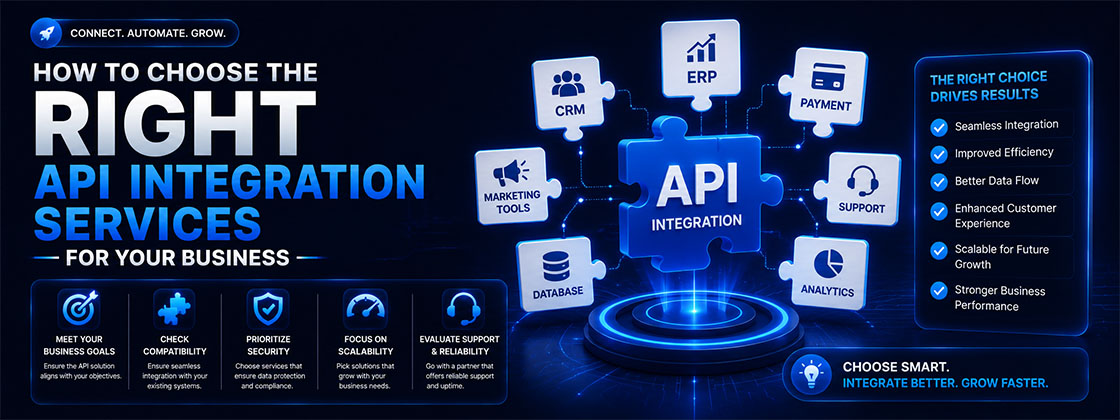
Most businesses don't lose time to one big problem — they lose it to a hundred small disconnects. A lead fills a form but doesn't reach the CRM for hours. An order ships, but inventory updates a day late. The fix is the same: API integration services that connect your systems so data moves automatically and in real time.
Whether you're weighing Custom API Development against off-the-shelf connectors or deciding whether to outsource at all, this guide covers exactly what to evaluate when choosing API integration development services for your business.
What Are API Integration Services?
An API (Application Programming Interface) is a set of rules that lets two software systems talk to each other. API integration services are the work of connecting those systems — your CRM, your website, your payment gateway, your marketing tools — so they exchange data without manual copy-pasting or duplicate entry.
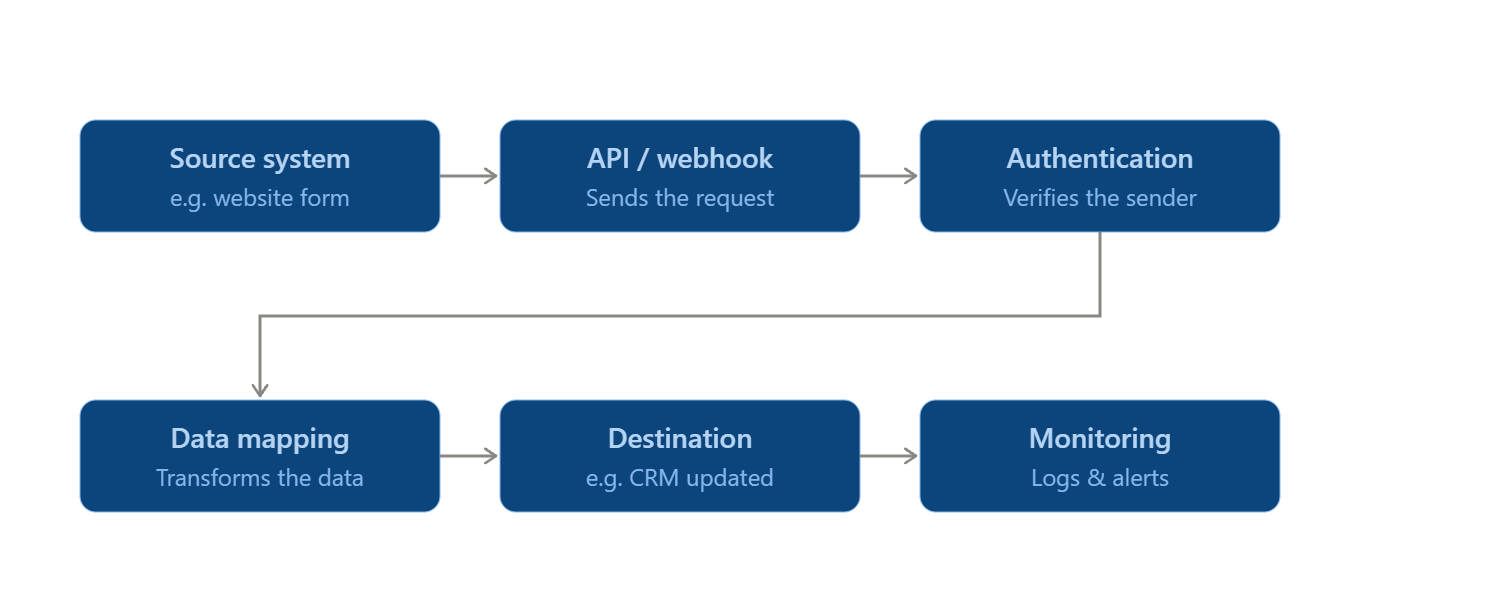
How APIs connect business systems: When a customer submits a form on your site, an API call can instantly create a lead in your CRM, trigger a welcome email, and notify sales — within seconds, with no one touching a spreadsheet.
API integration vs. API development: API development builds a new API from scratch, often to expose your product's data to partners.
Custom API development is usually paired with integration work, since a new API is only useful once it's connected to the systems that will use it — a distinction worth clarifying with any API integration development company upfront.
Why Does Your Business Need API Integration?
- Automate repetitive tasks: Eliminate manual steps like re-entering order details or exporting CRM reports by hand.
- Reduce manual data entry: Cut the errors and delays that come from staff copying data between disconnected tools.
- Synchronize data: Keep customer records, inventory, and financials consistent across every platform in real time.
- Improve operational efficiency: Free your team to focus on strategy and customer relationships instead of admin work.
Example in Practice Consider a mid-size real estate workflow for a brokerage running Meta and Google ad campaigns. Without integration, an agent manually copies each new lead from an ad platform's spreadsheet export into the CRM — often a day or two later, by which point the lead has gone cold. With a webhook-based integration connecting the ad platform, CRM, and WhatsApp, a form submission creates a CRM record, tags the source campaign, and triggers an automated WhatsApp response within seconds. The result isn't just time saved — it's the difference between reaching a lead while they're still comparing options and reaching them after they've already signed with a competitor. |
How Do API Integration Services Work?
A structured project moves through seven stages, whether you're connecting two systems or twenty:
- Discovery: Mapping current systems and integration goals.
- Architecture: Designing how systems connect, including data mapping.
- Authentication: Setting up secure access — API keys, OAuth, or certificates.
- Development: Building the connectors, middleware, or custom endpoints.
- Testing: Validating data accuracy and edge cases before go-live.
- Deployment: Rolling out to production with minimal disruption.
Monitoring: Tracking performance and uptime long-term.
For businesses combining APIs with intelligent automation, this foundation can also support AI workflow automation across CRM, sales, marketing, and operational systems.
Simple API Integration Workflow
Types of API Integrations for Businesses
Not every integration project looks the same. Here's where custom API integration typically shows up across a growing business:
- CRM: Connecting your site, ads, and support tools to Zoho or Salesforce so no lead falls through the cracks.
- ERP: Linking inventory, finance, and operations for a single source of truth.
- Payment: Integrating gateways like Razorpay or Stripe for secure transactions.
- Marketing: Syncing ad platforms with your CRM and lead-gen systems for accurate attribution.
- E-commerce: Connecting storefronts to inventory, shipping, and payment systems.
- SaaS: Linking the software tools your team relies on daily.
- AI Integrations: Feeding data into AI-driven workflows and chatbots for automated scoring and follow-up.
What to Look for in API Integration Services
Before signing on with an API integration partner, evaluate them against five criteria:
- Technical expertise: Proven experience on the platforms you actually use.
- Platform compatibility: Confirmed support for your CRM, ERP, or e-commerce stack.
- Security: Clear authentication, encryption, and data-handling practices.
- Scalability: Architecture that handles more systems and data as you grow, particularly for enterprise environments.
- Support: Ongoing monitoring and a real plan for when something breaks.
Key API Integration Features to Consider
The technical approach behind an integration determines how reliable and future-proof it will be. Here's what to ask any provider about:
| Feature | Why It Matters |
|---|---|
| REST | The most common architecture — lightweight, widely supported, and easy to scale |
| SOAP | Still used in banking and legacy enterprise systems requiring strict standards |
| GraphQL | Lets apps request exactly the data they need, reducing payload size |
| Webhooks | Push real-time event notifications instead of constant polling |
| Real-Time Sync | Keeps CRM, ERP, and marketing data consistent without delay |
| Authentication (OAuth, API Keys) | Controls who can access your data and what they can do |
| Error Handling | Prevents silent failures that quietly break workflows |
| Monitoring & Logging | Flags failed calls and latency issues before they escalate |
How to Evaluate an API Integration Provider
Look beyond the sales pitch. A genuine API integration consultant should be able to show, not just tell:
- Experience: Years of hands-on work, not just familiarity with API documentation.
- Portfolio: Real case studies and completed projects similar to your use case.
- Technical capabilities: Depth across REST, GraphQL, webhooks, and legacy protocols where needed.
- Client reviews: Independent feedback on reliability, communication, and delivery timelines.
- Support and maintenance: A defined plan for monitoring and fixing integrations after launch, not just at handover.
How Much Do API Integration Services Cost?
Pricing varies because every integration is different. The main cost drivers, and how each tends to move price:
- Integration complexity: A single pre-built connector (e.g., linking a form tool to a CRM via an existing app) sits at the low end; a custom-built, bidirectional sync between two systems with no native connector sits well above it.
- Number of systems: Cost doesn't scale linearly — each additional platform adds its own authentication, data mapping, and testing cycle, so a five-system integration typically costs more than five times a one-system integration.
- Custom development: Building a bespoke API endpoint (rather than using one that already exists) adds development and QA time on top of the integration itself.
- Security requirements: Regulated industries — finance, healthcare, insurance — typically require additional encryption, audit logging, and compliance review.
- Maintenance: Ongoing updates as connected platforms release new API versions or deprecate old ones — budget for this as a recurring line item, not a one-time cost.
- Support: The SLA-backed response time you need if something fails — same-day response typically costs more than best-effort support.
Practical Tip Ask any provider for a cost breakdown by stage — discovery, development, testing, support — rather than one lump figure. It makes quotes from different API integration experts easier to compare, and it exposes providers who skip testing and support to keep their headline number low. |
API Integration Services vs In-House Development
For many businesses, the real decision isn't which vendor to pick — it's whether to outsource at all. Here's how the two paths compare:
| Factor | API Integration Services | In-House Development |
|---|---|---|
| Cost | Predictable project or retainer pricing; no hiring overhead | Salaries and tooling costs continue even between projects |
| Expertise | Access to API integration experts across platforms | Limited to the skills already available on your team |
| Dev Time | Faster, using proven frameworks and reusable connectors | Slower due to learning curves and one-off builds |
| Maintenance | Monitoring and support can be built into the engagement | Falls to internal staff, often handled reactively |
| Scalability | Easy to scale as integration needs grow | Requires additional hiring to increase capacity |
Common API Integration Mistakes to Avoid
- Choosing on price alone: The cheapest quote often means the least testing and support.
- Ignoring security: Weak authentication or unencrypted transfer creates serious exposure.
- Poor documentation: Undocumented integrations are nearly impossible to maintain.
- No testing strategy: Skipping edge-case testing leads to silent data errors.
- Lack of maintenance: APIs change over time — integrations without upkeep quietly break.
How to Choose the Right API Integration Services
Use this checklist when comparing providers:
- Expertise: Experience with your specific systems.
- Security: Documented data-protection practices.
- Scalability: Architecture that grows with your business.
- Compatibility: Confirmed support for your tech stack.
- Testing: A defined QA process before go-live.
- Support: Ongoing monitoring, not one-time delivery.
- Pricing: Transparent, stage-based cost breakdowns.
- Track record: Verifiable results from past clients.
Get the Right API Integration Services for Your Business
Choosing the right partner for API Development isn't just technical — it's operational, affecting how fast your team moves and how reliable your data stays.
Evokast Digital Ventures works as an enterprise API integration services and CRM automation partner, connecting marketing, sales, and operations into one revenue engine — backed by API automation services that keep things running after launch.
Book an API Integration Consultation with EvoKast to discuss your current workflow, integration requirements, and opportunities for automation.